
Download Niftio – Create Professional Presentations Fast
Overview
Niftio is a cloud‑based presentation builder that promises to turn a blank slide deck into a polished, visually striking digital presentation in almost no time. By leveraging a massive library of ready‑made templates, high‑resolution stock images, and customizable charts, the platform eliminates the endless back‑and‑forth that usually slows down content creators. Whether you are a marketer racing to deliver a pitch, a teacher preparing a lesson, or a startup founder needing a compelling investor deck, Niftio’s “create‑once‑share‑anywhere” philosophy lets you focus on the story rather than the design minutiae.
The service works entirely online, meaning you never have to install bulky software or worry about version compatibility. Once a presentation is finished, it can be shared via a simple link that plays back on any device with a web browser—no PowerPoint or PDF needed. This flexibility is especially valuable for remote teams that need to collaborate across Windows, macOS, Android, and iOS platforms.
Niftio also offers a free tier that includes thousands of royalty‑free images and basic charting tools, while premium plans unlock advanced animations, brand‑level customization, and priority support. In short, Niftio is positioned as the “fast‑track” solution for anyone who wants a professional‑looking slide deck without the steep learning curve of traditional design software.
Key Features That Set Niftio Apart
- Thousands of Ready‑Made Templates: From sleek corporate layouts to creative storytelling canvases, each template is fully editable.
- Free High‑Resolution Image Library: Access over 10,000 royalty‑free photos, icons, and illustrations without leaving the editor.
- Dynamic Charts & Graphs: Build data‑driven visuals with drag‑and‑drop controls; data can be pasted from Excel or Google Sheets.
- Custom Shapes & Icons: Over 500 vector shapes and icons that can be recolored to match any brand palette.
- One‑Click Sharing via Link: Publish a presentation as a web link that works on any browser, eliminating the need for downloads.
- Real‑Time Collaboration: Invite teammates to edit the same deck simultaneously, with change tracking and comments.
- Offline Export Options: Export to PDF, PPTX, or MP4 video for presentations that require a local file.
- Auto‑Save & Version History: Never lose work; revert to earlier versions with a single click.
- Brand Kit Integration: Upload logos, fonts, and color codes to keep every slide on‑brand.
- Secure Cloud Storage: All presentations are encrypted at rest and in transit, complying with GDPR and CCPA standards.
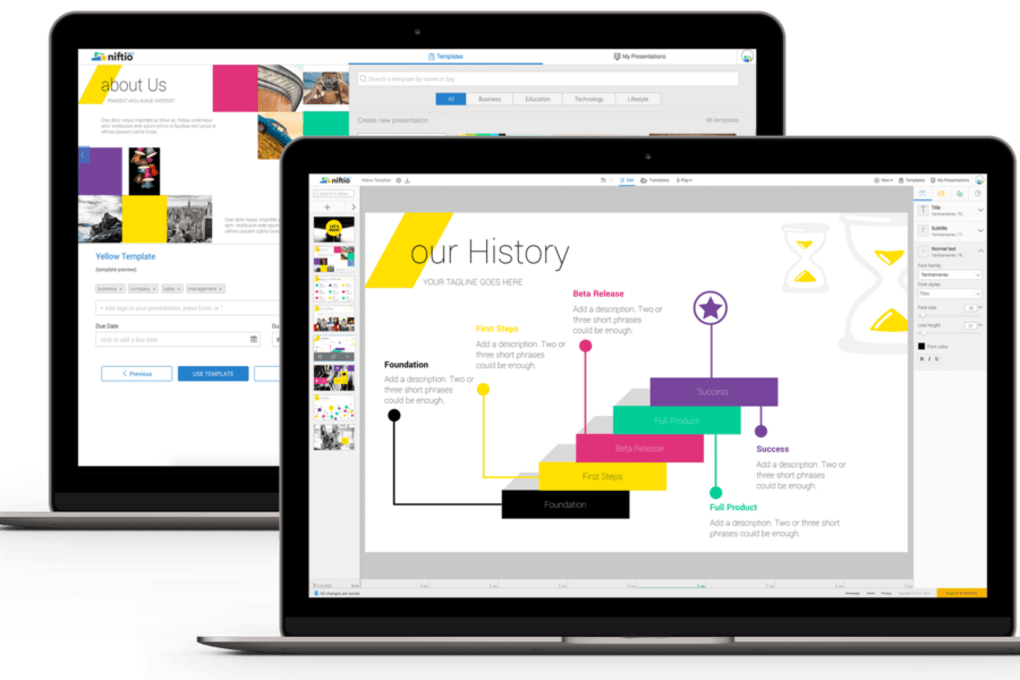
These features are thoughtfully bundled to reduce the time spent on design decisions. For example, the chart builder automatically suggests the most appropriate visualization based on the data pattern, while the template library includes pre‑wired slide transitions that look professional without any animation expertise. Niftio’s emphasis on a seamless sharing experience also means you can embed a presentation directly into a website or LMS, making it a versatile tool for educators and marketers alike. The combination of free assets, collaborative editing, and secure cloud hosting positions Niftio as a strong competitor to heavyweight desktop apps while keeping the price point accessible for freelancers and small teams.
Installation, Usage Guide & Compatibility
Because Niftio is a web‑based application, there is no traditional installation process. Getting started is as simple as navigating to niftio.com, creating a free account, and launching the editor in your browser. The platform supports all modern browsers, including Chrome, Firefox, Edge, and Safari. For users who prefer a desktop shortcut, Niftio offers optional progressive web app (PWA) support: click the “Add to Home Screen” prompt in Chrome or Safari to create a pseudo‑app that opens in a dedicated window without browser UI clutter.
Step‑by‑Step Usage:
1. Sign Up / Log In: Use an email address or single sign‑on via Google or Microsoft.
2. Select a Template: Browse categories or search by keyword; preview each template before selection.
3.
Insert Content: Drag images, paste text, or import data tables. Niftio’s smart placeholders automatically resize content to maintain visual balance.
4. Customize Design: Adjust colors, fonts, and layout using the right‑hand style panel.
Use the Brand Kit for instant brand compliance.
5. Collaborate: Click “Share” to generate an edit link or invite collaborators via email.
6. Publish or Export: Choose “Publish Link” for instant web playback, or export to PDF/PPTX/MP4 for offline delivery.
7.
Save & Reuse: All projects are stored in the cloud; you can clone a deck to reuse its structure for future presentations.
Niftio is designed to be platform‑agnostic. Because the editor runs in a browser, it works on Windows 10/11, macOS Monterey and later, Linux distributions with a supported browser, as well as mobile devices running Android 8+ or iOS 13+. The responsive UI automatically adjusts toolbars and canvas size for touch‑enabled tablets, ensuring a smooth experience whether you’re drafting on a laptop or polishing slides on a phone.
Security‑focused users will appreciate that Niftio employs HTTPS everywhere, two‑factor authentication (2FA) for account protection, and regular automated backups. For enterprises, admin dashboards provide user management, single‑sign‑on (SSO) via SAML, and audit logs to meet compliance requirements. Overall, the lack of a heavy client installer, combined with broad OS support and strong security, makes Niftio a low‑maintenance yet powerful addition to any workflow.
Pros, Cons, FAQ & Final Thoughts
Pros
- Fast creation with high‑quality templates and free image library.
- Fully cloud‑based – no installation, automatic updates, and cross‑device access.
- Robust collaboration tools with real‑time editing and commenting.
- One‑click web sharing eliminates compatibility issues across platforms.
- Secure storage, GDPR compliance, and optional 2FA for added safety.
Cons
- Advanced animation features are limited compared to desktop PowerPoint.
- Offline editing is only possible after exporting; live editing requires internet.
- Free tier imposes a watermark on exported PDFs and limits the number of saved projects.
Frequently Asked Questions
Is Niftio really free to use?
Niftio offers a free tier that includes unlimited access to templates, a large image library, and basic charting tools. The free version adds a discreet watermark to exported PDFs and caps the number of active projects. Upgrading to a paid plan removes the watermark and unlocks premium assets, advanced animations, and priority support.
Can I import PowerPoint files into Niftio?
Yes. Niftio supports importing .pptx files. The platform converts each slide into editable elements, allowing you to replace images, adjust layouts, or apply new templates without starting from scratch.
How secure is my data on Niftio?
All data is encrypted both in transit (TLS 1.2) and at rest (AES‑256). Niftio complies with GDPR and CCPA, offers two‑factor authentication, and provides audit logs for enterprise accounts. Regular backups ensure you can recover presentations even in rare outage scenarios.
Do I need a powerful computer to run Niftio?
Since Niftio runs in the browser, it works well on modest hardware. A modern browser, a stable internet connection, and at least 4 GB of RAM are sufficient for most presentations. Complex animations may benefit from a faster GPU, but the core editor remains responsive on most laptops.
Can I use Niftio on mobile devices?
Absolutely. Niftio’s responsive UI works on Android and iOS tablets and phones. While full‑screen editing is more comfortable on a desktop, you can review, annotate, and share presentations directly from your mobile device.
Conclusion & Call to Action
In a market flooded with heavyweight desktop suites, Niftio stands out by delivering a fast, secure, and collaborative environment for creating professional presentations. Its extensive template library, free high‑quality images, and instant web sharing make it a perfect fit for busy professionals who value time as much as aesthetics. While power users might miss some deep‑level animation controls, the trade‑off is a dramatically reduced learning curve and zero maintenance overhead. If you’re looking to streamline your slide‑creation workflow, enhance team collaboration, and guarantee that every deck looks polished on any device, Niftio is worth a try. Download Niftio today, start your first free presentation, and experience how effortless great design can be.



.png)



